 你的薇笑
你的薇笑说明
Docx工具用于生成、修改word文档。
Easily generate and modify .docx files with JS/TS. Works for Node and on the Browser.
- 本文所使用的版本为
8.2.4 - 一下内容,假设我们有问题的文件名称为
test.docx
问题1:导出后用word2007打不开
原因
有一些旧版本不支持的写法,需要根据打开文件时的错误提示针对性解决
解决过程
一、定位到报错代码
- 打开
test.docx时会提示报错,点击“详细信息”,可以看到如下界面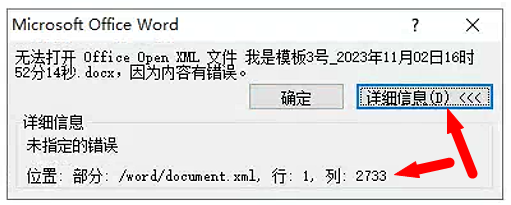
- 这里已经告诉你了哪个文件第几行第几列有问题,但是如何查看对应文件?
- 将
test.docx的后缀改为.zip==>test.zip,然后解压到任意位置,得到如下文件
test
 ├─ _rels
 ├─ docProps
 ├─ word
└─ [Content_Types].xmlword/document.xml文件就是报错里提示的文件了,需要格式化一下方便阅读
- 可以使用
xml编辑工具打开并格式化; - 可以使用
vscode打开并右键格式化(如果不支持xml,就把文件后缀改为.html)
- 格式化后,保存文件,(如果修改为
.html了记得改回.xml) - 回到
test文件夹根路径下,压缩为新的zip包,文件名随意,假设为test.zip - 将
test.zip重命名为test-1.docx,打开test-1.docx - 这时候回到第1步,可以看到报错不再是“第1行第x列”了,而提示格式化后的行数和列数
- 回到第4步的
xml编辑器中,找到对应的行和列,如果用vscode的话,可以ctrl+l输入 - 找到后会发现这个报错的定位处于一个xml标签元素的末尾,表示当前这个元素有问题,具体哪里有问题接着往下看
二、排查问题
有两种排查方式,第一种去office规范官网查xml规范,但是我没找到word2007的规范。改为第二种方式:用word2007创建文件,假设叫2007.docx,然后导出xml,和test.docx的xml对比差异。
- 遇到的第1个问题,不能用
cm单位
html
<!-- 我的 -->
<w:pgMar w:top="2.54cm" w:right="3.18cm" w:bottom="2.54cm" w:left="3.18cm"
         w:header="851" w:footer="992" w:gutter="0"/>
<!-- 用`2007.docx`的xml对比一下 -->
<w:pgMar w:top="1440" w:right="1800" w:bottom="1440" w:left="1800"
w:header="851" w:footer="992" w:gutter="0"/>所以只能用最终计算好的Twip单位,通过测试也发现:
- 直接用word导出,无论哪个版本都是Twip单位
- Docx文档、demo、测试用例都是用Twip单位
当时懒得计算,就直接用cm了,结果2007版本中不能用,计算方式:1cm≈567,更多跟单位有关的细节可以查看:word中的单位和px、pt是什么关系。
- 对齐方式的值不能大写
html
<w:pPr>
  <w:jc w:val="LEFT"/>
  <w:rPr>
    <w:vertAlign w:val="baseline"/>
    <w:lang w:val="en-US" w:eastAsia="zh-CN"/>
  </w:rPr>
</w:pPr>上面写法是错的,正确应该是小写left,或者推荐用docx的常量:
js
new Paragraph({
    alignment: AlignmentType.LEFT,
}),- 表格宽度不能设置百分比
html
<!-- 我的 -->
<w:tblW w:type="pct" w:w="100%"/>
<!-- 用`2007.docx`的xml对比一下 -->
<w:tblW w:type="auto" w:w="0%"/>需要通过计算每一列的值,将表格撑开为100%的效果,然后生成columnWidths的值,并且每一个TableCell的宽度也需要对应上:
js
const table = new Table({
    columnWidths: [4261, 4261],
    rows: [
        new TableRow({
            children: [
                new TableCell({
                    width: {
                        size: 4261,
                        type: WidthType.DXA,
                    },
                    children: [new Paragraph("Vinsea")],
                }),
                new TableCell({
                    width: {
                        size: 4261,
                        type: WidthType.DXA,
                    },
                    children: [new Paragraph("Vinsea")],
                }),
            ],
        })
    ]
})如果你的word左右内边距也和我的一样是2.54cm,那么总宽度就是8522。
具体如何计算,和前面的cm问题一样,查看:word中的单位和px、pt是什么关系。
- 含有图片文件,也打不开
html
<!-- 我的 -->
<pic:cNvPr id="1" name="" descr="" title="" />
<!-- 用`2007.docx`的xml对比一下 -->
<pic:cNvPr id="1" name="" descr=""/>就是多了个title属性,在创建图片对象时,需要显式申明altText对象并且不能有title:
js
new Paragraph({
    children: [
        new ImageRun({
            data: "xx",
            transformation: {
                width: 100,
                height: 100
            },
            altText: {
                description: "123",
                name: "123"
            }
        })
    ]
})关于word2007的问题没遇到其他的了,如果你有别的问题,就按照我这个方式来排查,虽然麻烦了点,但最终也能解决了根本问题。